
要注意的是,Redux 和 React-redux 并不是同一个东西。Redux 是一种架构模式(Flux 架构的一种变种),它不关注你到底用什么库,你可以把它应用到 React 和 Vue,甚至跟 jQuery 结合都没有问题。而 React-redux 就是把 Redux 这种架构模式和 React.js 结合起来的一个库,就是 Redux 架构在 React.js 中的体现。
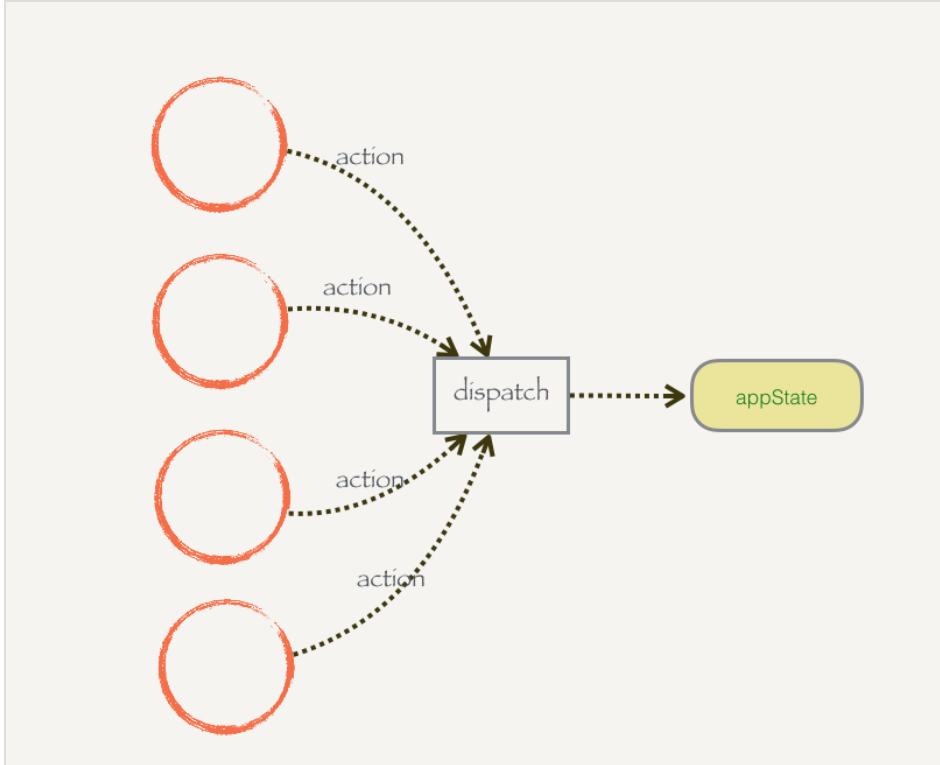
模块(组件)之间可以共享数据 ,也可以修改数据,但是数据并不能直接修改,只能执行某些我允许的某些修改
dispatch
专门负责数据的修改
可以在组件发生某个事件时调用
所有对数据的操作必须通过 dispatch 函数。它接受一个参数 action,这个 action 是一个普通的 JavaScript 对象,里面必须包含一个 type 字段来声明你到底想干什么。dispatch 在 swtich 里面会识别这个 type 字段,能够识别出来的操作才会执行对 appState 的修改。
action {type: ‘UPDATE_SOMETHINF’, prop: ‘newState’}
store
1 | const store = createStore(state, stateChanger) |
构建一个函数createStore来专门生成store,把state和dispatch集中到一个地方,这样别的app也可以用这种模式了
针对每个不同的 App,我们可以给 createStore 传入初始的数据 appState,和一个描述数据变化的函数 stateChanger,然后生成一个 store。需要修改数据的时候通过 store.dispatch,需要获取数据的时候通过 store.getState。store 也允许我们通过 store.subscribe 监听数据数据状态被修改了,并且进行后续的例如重新渲染页面的操作。
reducer(state, action)
state保存应用的状态
把state和stateChanger和在一起
负责初始state,以及根据state和action计算新的state
action参数在dispatch调用时传入
reducer函数返回新的state
注意: 在reducer计算新的state时,不可改变原state
state为对象
如果state是引用对象,一定要先对state进行拷贝,防止改变原state
state为数组
array.slice(start, end)
在state为引用数据类型时,可以使用扩展运算符来进行浅拷贝
combineReducer
Redux提供了一个工具函数:combineReducer({ })
1 | state = { |
action
action是dispatch的参数
action的必要属性type决定reducer对state进行何种处理,可以携带payload参数并传递给dispatch,这个payload参数是state更新时需要参与计算的数据
action creators
用来封装action
1 | export const initComments = (comments) => { |
createStore(reducer)
生成store
总结:
1 | // 定义一个 reducer |